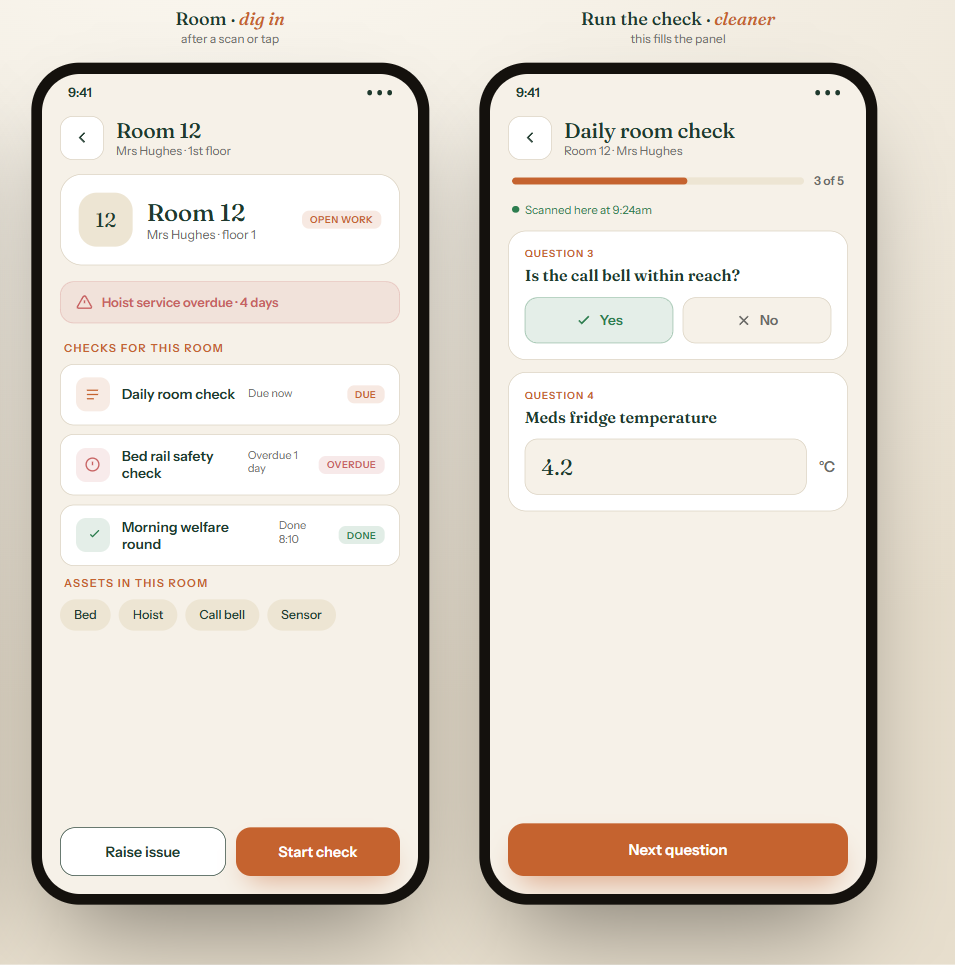
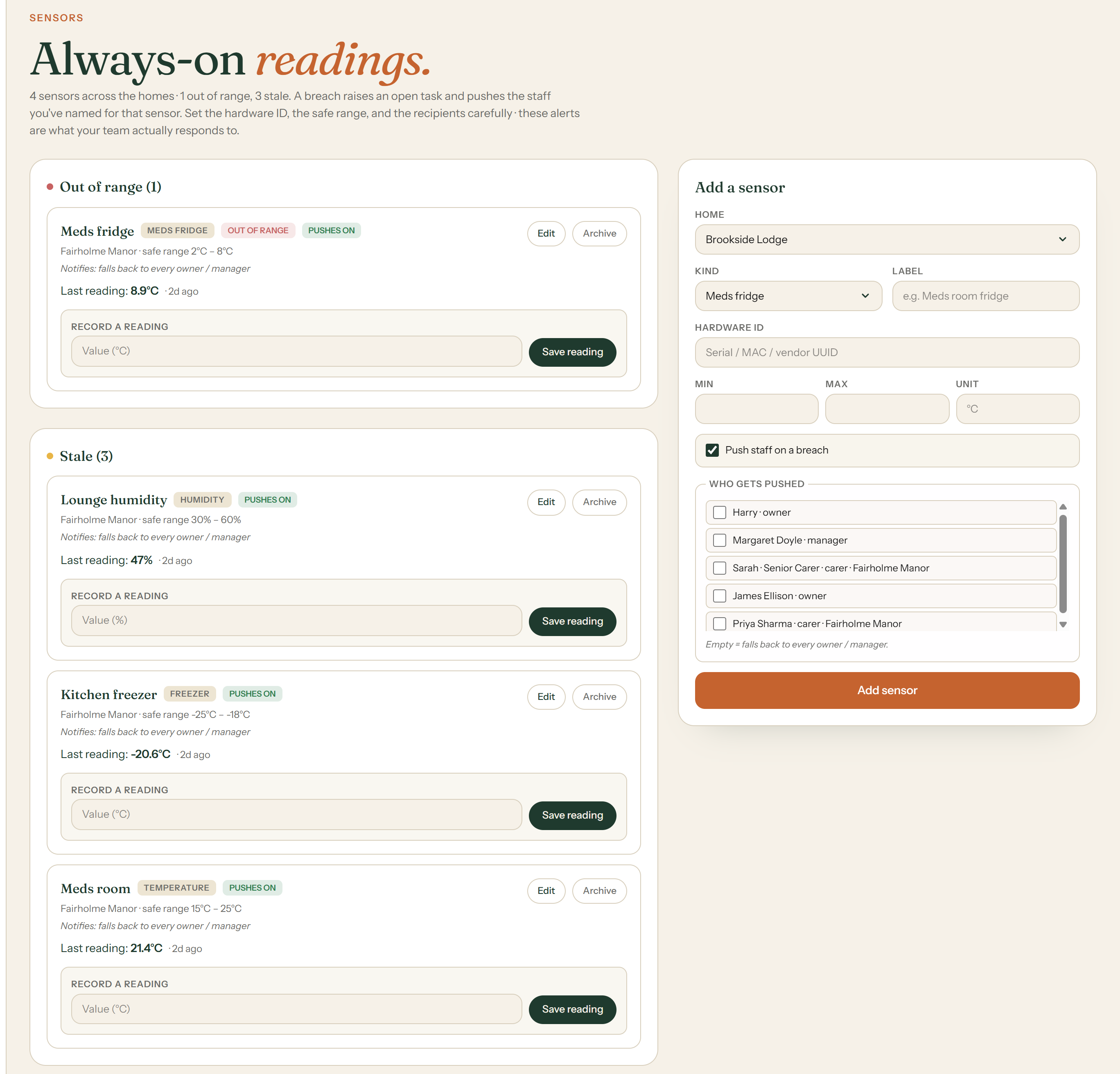
The meds fridge reads 4.2°C, and nobody had to check it.
Temperature and humidity sensors watch the meds room, the fridge and the freezer around the clock. A reading out of range raises a task and pushes the staff you have named, so someone attends, acts and closes it with proof. Optional add-on, £150 per home per month.
| A | B | C | D | E | F | |
|---|---|---|---|---|---|---|
| 1 | Date | AM temp | PM temp | Initials | Notes | |
| 2 | 01/03 | 3.8 | 4.1 | JD | ||
| 3 | 02/03 | 4 | JD | pm missed | ||
| 4 | 03/03 | 4.2 | 4.5 ish | SM | ||
| 5 | 04/03 | ? | thermometer broken | |||
| 6 | 05/03 | 4.1 | 4 | JD | ||
| 7 | 06/03 | weekend | ||||
| 8 | 07/03 | weekend | ||||
| 9 | 08/03 | 8.9 | SM | left door open?? | ||
| 10 | ||||||
| 11 | ||||||
| 12 | ||||||
| 13 | ||||||
| 14 | ||||||
| 15 | ||||||
| 16 | ||||||
| 17 | ||||||
| 18 | ||||||
| 19 | ||||||
| 20 | ||||||
| 21 | ||||||
| 22 | ||||||
| 23 | ||||||
| 24 | ||||||
| 25 | ||||||
| 26 | ||||||
| 27 | ||||||
| 28 | ||||||
| 29 | ||||||
| 30 | ||||||
| 31 | ||||||
| 32 | ||||||
| 33 | ||||||
| 34 | ||||||
| 35 | ||||||
| 36 | ||||||
| 37 | ||||||
| 38 | ||||||
| 39 | ||||||
| 40 | ||||||
| 41 | ||||||
| 42 | ||||||
| 43 | ||||||
| 44 | ||||||
| 45 | ||||||
| 46 | ||||||
| 47 | ||||||
| 48 |
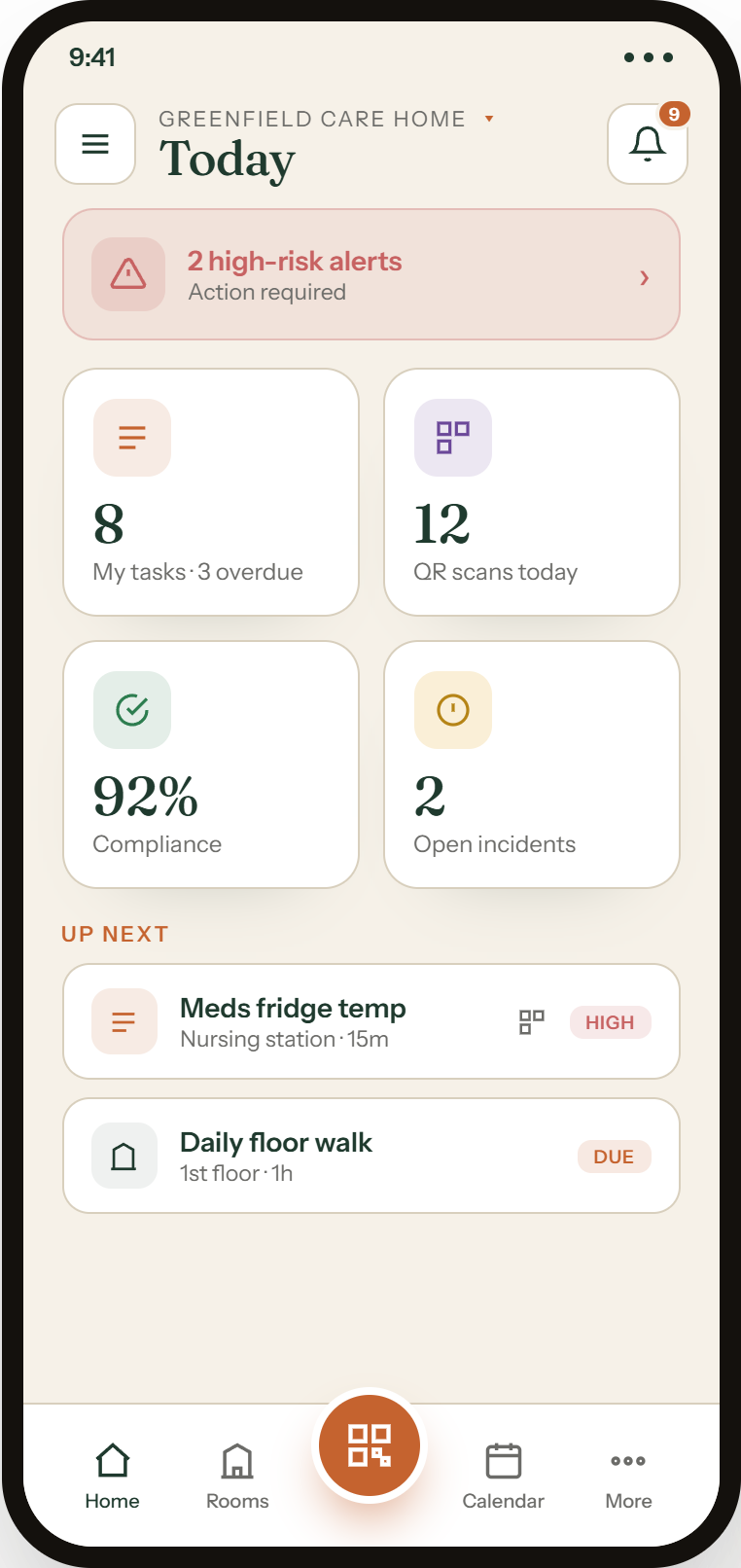
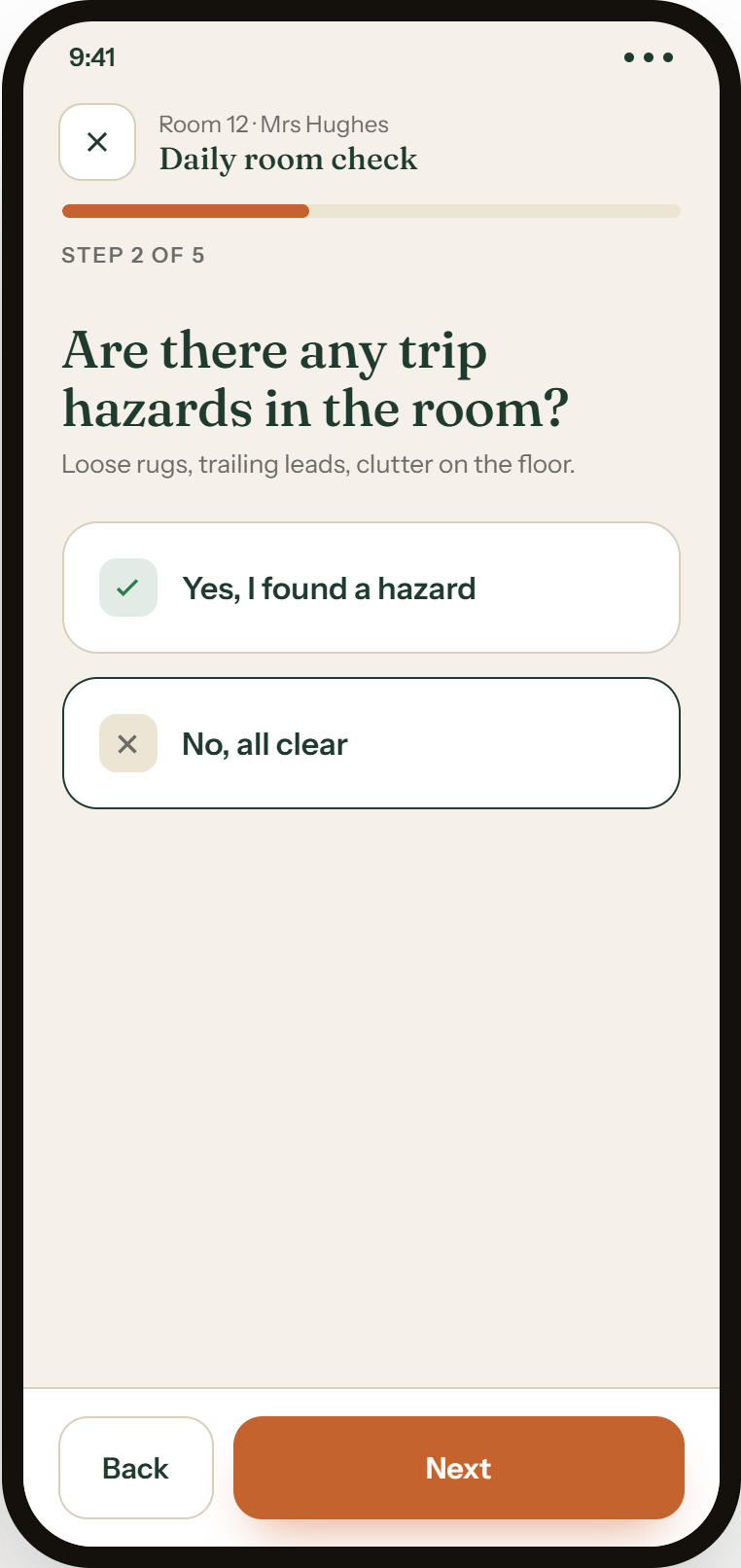
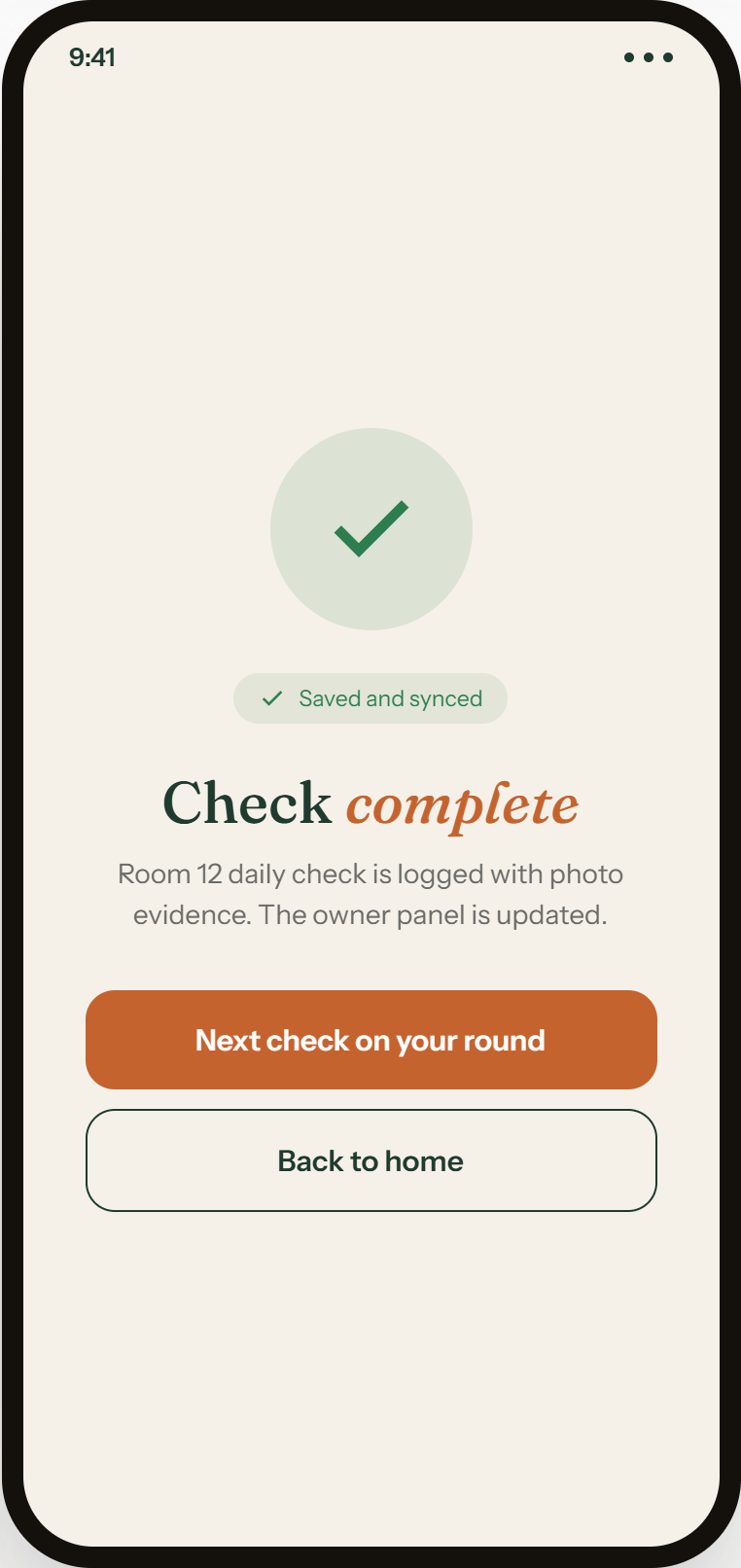
Priya scans the doorframe, and the morning round begins.
The QR scan stamps who, where and when, and opens the right checklist for that kind of room. No clipboard, no writing up afterwards, and good staff finally get credit for work that used to be invisible.
| A | B | C | D | E | F | |
|---|---|---|---|---|---|---|
| 1 | Room | Mon | Tue | Wed | Who | |
| 2 | Room 1 | Y | Y | Y | Priya | |
| 3 | Room 2 | Y | y | Priya | ||
| 4 | Room 4 | Y | ? | |||
| 5 | Room 7 | see notes | Y | Y | Dave | |
| 6 | Room 9 | Y | Y | n/a | agency | |
| 7 | Room 12 | ask Sarah | ||||
| 8 | Lounge | Y | Y | |||
| 9 | Meds room | Y | Y | Emily? | ||
| 10 | ||||||
| 11 | ||||||
| 12 | ||||||
| 13 | ||||||
| 14 | ||||||
| 15 | ||||||
| 16 | ||||||
| 17 | ||||||
| 18 | ||||||
| 19 | ||||||
| 20 | ||||||
| 21 | ||||||
| 22 | ||||||
| 23 | ||||||
| 24 | ||||||
| 25 | ||||||
| 26 | ||||||
| 27 | ||||||
| 28 | ||||||
| 29 | ||||||
| 30 | ||||||
| 31 | ||||||
| 32 | ||||||
| 33 | ||||||
| 34 | ||||||
| 35 | ||||||
| 36 | ||||||
| 37 | ||||||
| 38 | ||||||
| 39 | ||||||
| 40 | ||||||
| 41 | ||||||
| 42 | ||||||
| 43 | ||||||
| 44 | ||||||
| 45 | ||||||
| 46 | ||||||
| 47 | ||||||
| 48 |
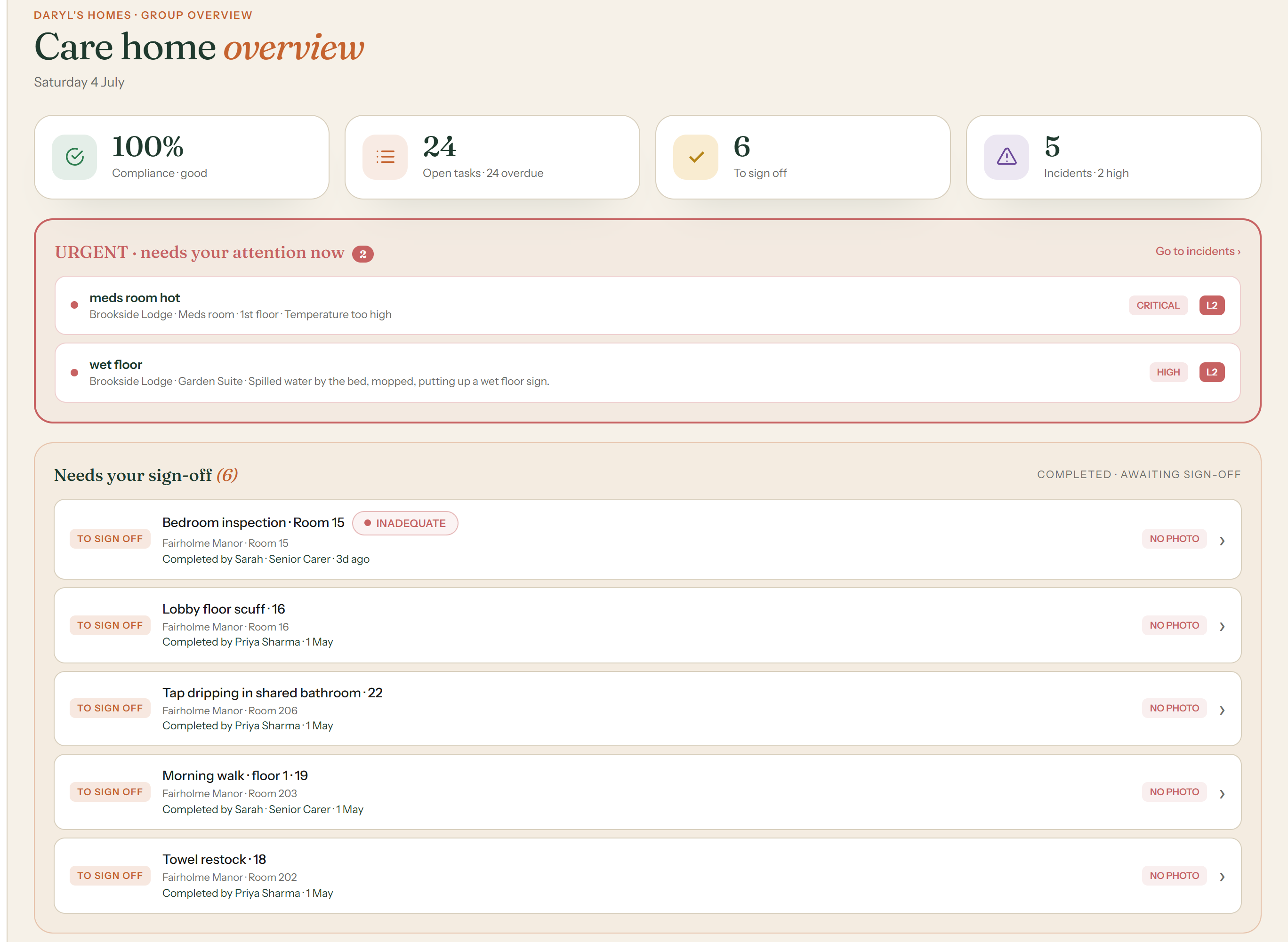
A fire door fails its check. The room turns red before breakfast.
One safety-critical failure turns the whole room red and puts it at the top of your morning, above everything else. You see trouble the day it starts, not the week an inspector finds it.
| A | B | C | D | E | F | |
|---|---|---|---|---|---|---|
| 1 | Item | Reported | By | Status | Notes | |
| 2 | fire door rm 4 | Feb? | night staff | open? | wedged again | |
| 3 | loose rail L2 | 12/02 | SM | ask Mike | ||
| 4 | light out corridor | 15/02 | done? | |||
| 5 | radiator cold rm 8 | 20/02 | JD | parts on order? | ||
| 6 | window latch rm 3 | can't find email | ||||
| 7 | sluice door slow | 02/03 | Dave | open | ||
| 8 | ||||||
| 9 | ||||||
| 10 | ||||||
| 11 | ||||||
| 12 | ||||||
| 13 | ||||||
| 14 | ||||||
| 15 | ||||||
| 16 | ||||||
| 17 | ||||||
| 18 | ||||||
| 19 | ||||||
| 20 | ||||||
| 21 | ||||||
| 22 | ||||||
| 23 | ||||||
| 24 | ||||||
| 25 | ||||||
| 26 | ||||||
| 27 | ||||||
| 28 | ||||||
| 29 | ||||||
| 30 | ||||||
| 31 | ||||||
| 32 | ||||||
| 33 | ||||||
| 34 | ||||||
| 35 | ||||||
| 36 | ||||||
| 37 | ||||||
| 38 | ||||||
| 39 | ||||||
| 40 | ||||||
| 41 | ||||||
| 42 | ||||||
| 43 | ||||||
| 44 | ||||||
| 45 | ||||||
| 46 | ||||||
| 47 | ||||||
| 48 |
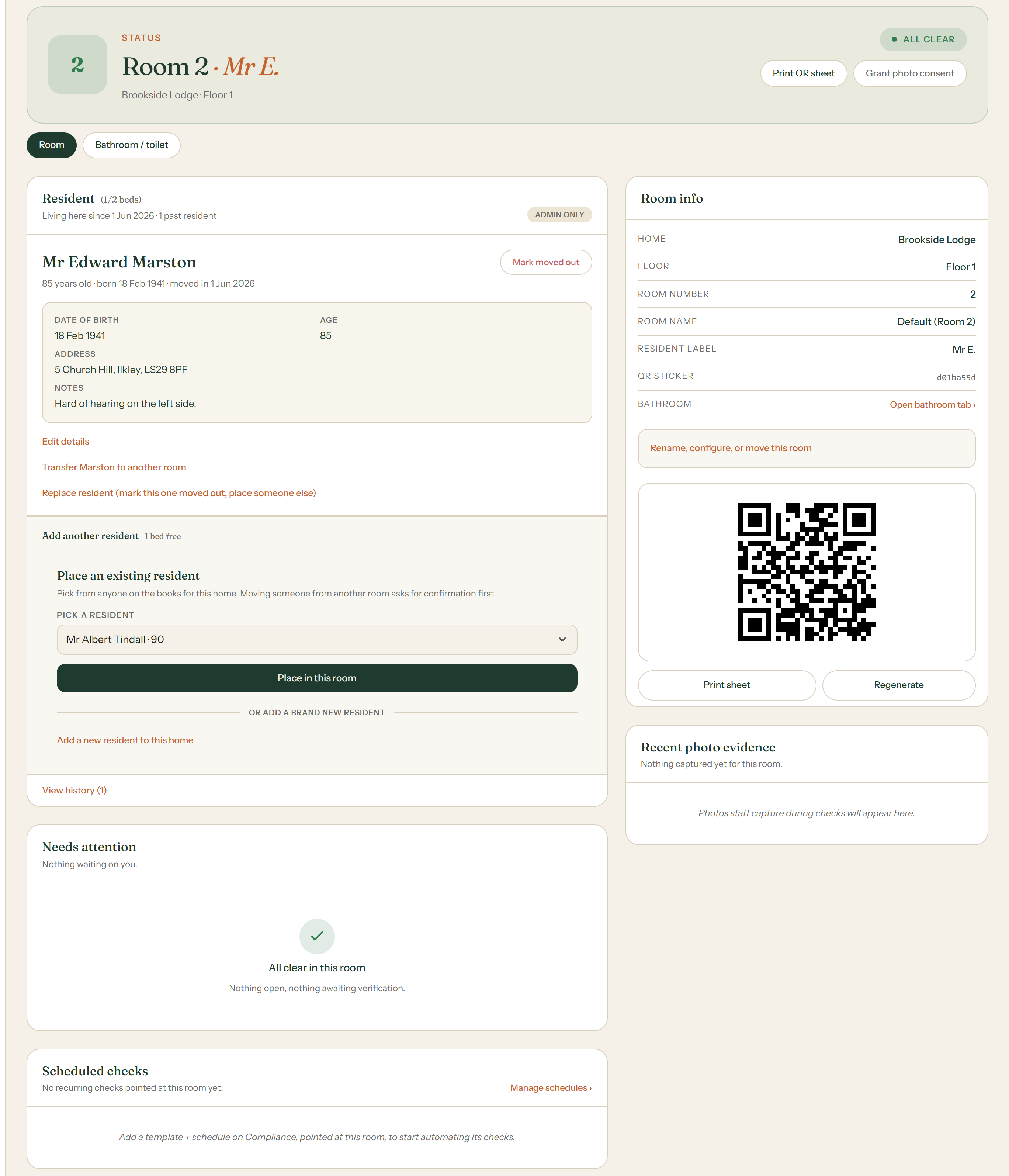
Fixed, photographed and signed off from your kitchen table.
The whole story of that door lives on one screen: the failed check, the work order, the photo of the fix and your one-tap sign-off. No binder, no spreadsheet, no chasing anyone by phone.
| A | B | C | D | E | F | |
|---|---|---|---|---|---|---|
| 1 | Photo | Where saved | Date | Room | Notes | |
| 2 | IMG_4412.jpg | Dave's phone | ?? | 4 | ||
| 3 | IMG_4413.jpg | email? | 4 | ask reception | ||
| 4 | door fix | not taken | 4 | |||
| 5 | hoist service | WhatsApp group | Jan | scroll up a lot | ||
| 6 | wet floor sign | Sarah's phone | 9 | she left | ||
| 7 | kitchen audit pics | USB stick | 2023 | which drawer? | ||
| 8 | ||||||
| 9 | ||||||
| 10 | ||||||
| 11 | ||||||
| 12 | ||||||
| 13 | ||||||
| 14 | ||||||
| 15 | ||||||
| 16 | ||||||
| 17 | ||||||
| 18 | ||||||
| 19 | ||||||
| 20 | ||||||
| 21 | ||||||
| 22 | ||||||
| 23 | ||||||
| 24 | ||||||
| 25 | ||||||
| 26 | ||||||
| 27 | ||||||
| 28 | ||||||
| 29 | ||||||
| 30 | ||||||
| 31 | ||||||
| 32 | ||||||
| 33 | ||||||
| 34 | ||||||
| 35 | ||||||
| 36 | ||||||
| 37 | ||||||
| 38 | ||||||
| 39 | ||||||
| 40 | ||||||
| 41 | ||||||
| 42 | ||||||
| 43 | ||||||
| 44 | ||||||
| 45 | ||||||
| 46 | ||||||
| 47 | ||||||
| 48 |
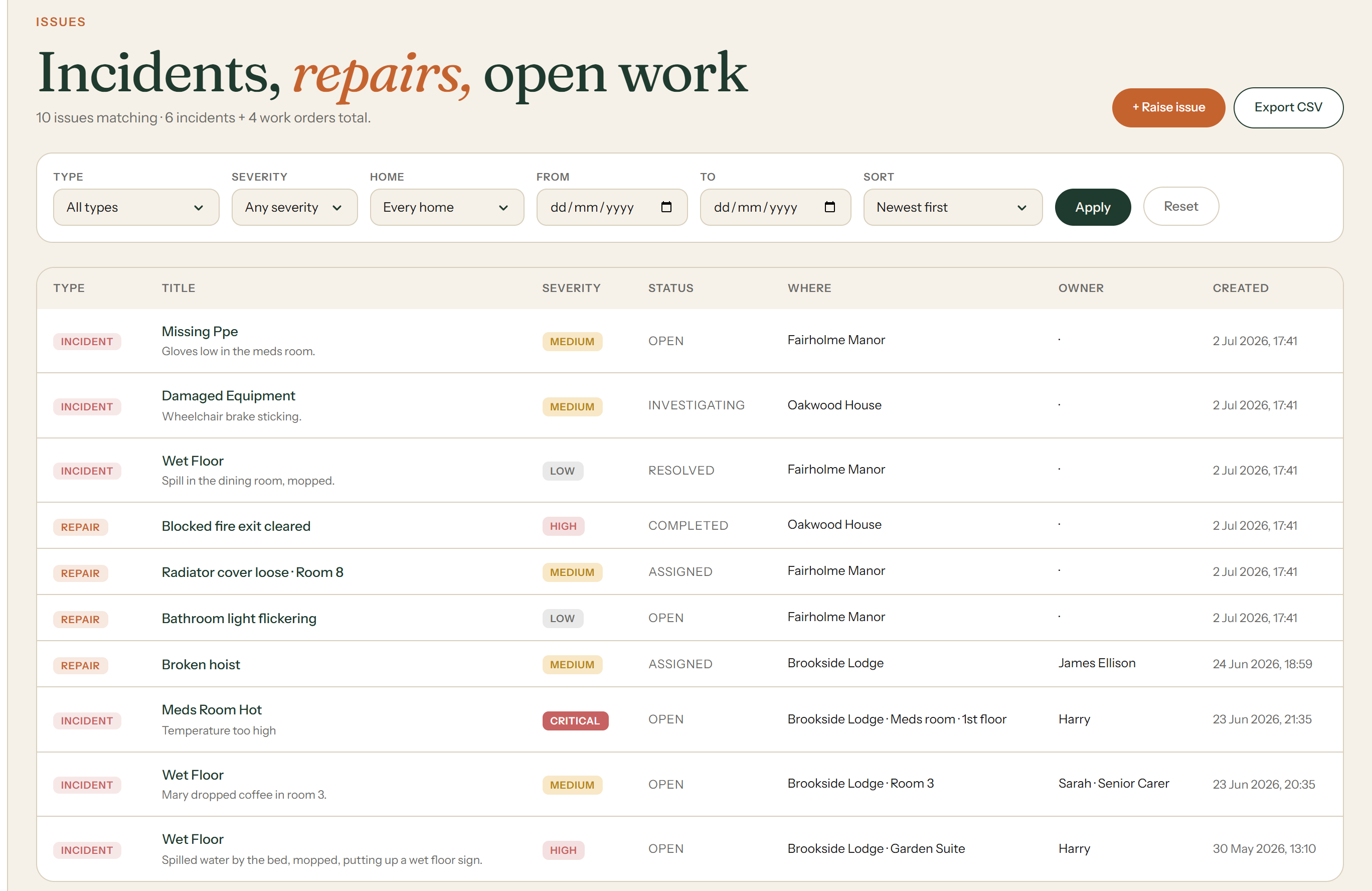
A tap drips in bathroom 22. It cannot be forgotten.
Every fault and hazard has an owner, a status and a photo, and it stays open until a manager approves it closed. The night team inherits it automatically, and anything that sits too long climbs the chain on its own.
| A | B | C | D | E | F | |
|---|---|---|---|---|---|---|
| 1 | Issue | Shift | Room | Follow-up | Done? | |
| 2 | tap dripping | day | 22 | night?? | ||
| 3 | wet floor | night | 9 | mopped | y | |
| 4 | bulb dining rm | day | told Mike | |||
| 5 | call bell slow | night | 15 | recheck | ? | |
| 6 | window stuck | day | 3 | |||
| 7 | fridge beeping | night | kitchen | see fridge sheet | ||
| 8 | ||||||
| 9 | ||||||
| 10 | ||||||
| 11 | ||||||
| 12 | ||||||
| 13 | ||||||
| 14 | ||||||
| 15 | ||||||
| 16 | ||||||
| 17 | ||||||
| 18 | ||||||
| 19 | ||||||
| 20 | ||||||
| 21 | ||||||
| 22 | ||||||
| 23 | ||||||
| 24 | ||||||
| 25 | ||||||
| 26 | ||||||
| 27 | ||||||
| 28 | ||||||
| 29 | ||||||
| 30 | ||||||
| 31 | ||||||
| 32 | ||||||
| 33 | ||||||
| 34 | ||||||
| 35 | ||||||
| 36 | ||||||
| 37 | ||||||
| 38 | ||||||
| 39 | ||||||
| 40 | ||||||
| 41 | ||||||
| 42 | ||||||
| 43 | ||||||
| 44 | ||||||
| 45 | ||||||
| 46 | ||||||
| 47 | ||||||
| 48 |
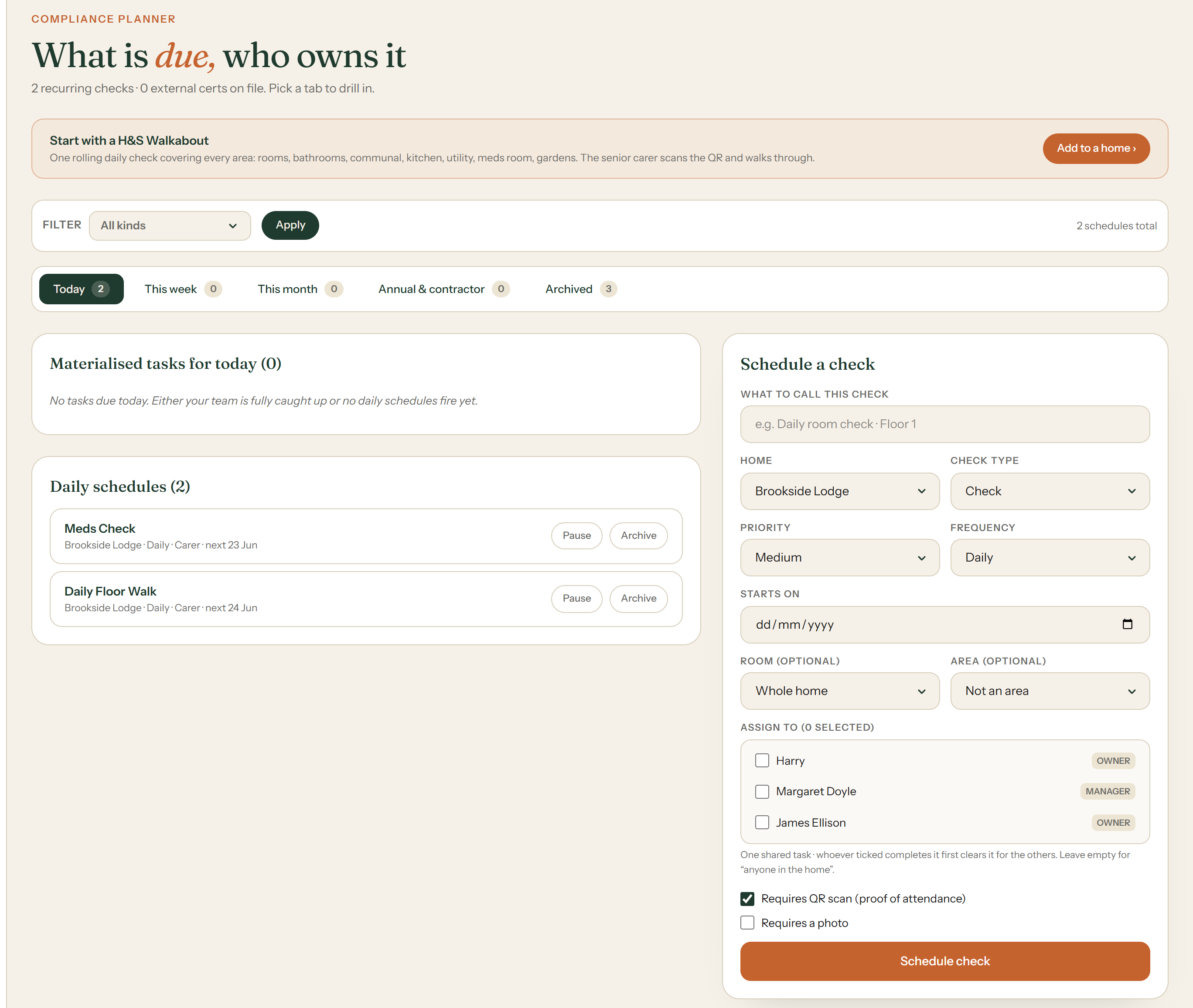
Tomorrow's checks write themselves while you drive home.
Recurring checks are scheduled once and generated forever: fridge temperatures, fire doors, Legionella flushes, room inspections. Anything missed gets chased automatically, so nobody spends Sunday night with a rota and a ruler.
| A | B | C | D | E | F | |
|---|---|---|---|---|---|---|
| 1 | Check | Mon | Wed | Fri | Who | |
| 2 | fridge temp | Y | Y | ? | ||
| 3 | fire doors | Y | Mike? | |||
| 4 | legionella flush | ?? | kitchen staff | |||
| 5 | room checks | Y | Y | Y | whoever is on | |
| 6 | hoist check | monthly? | ||||
| 7 | PAT testing | 2022?? | ||||
| 8 | ||||||
| 9 | ||||||
| 10 | ||||||
| 11 | ||||||
| 12 | ||||||
| 13 | ||||||
| 14 | ||||||
| 15 | ||||||
| 16 | ||||||
| 17 | ||||||
| 18 | ||||||
| 19 | ||||||
| 20 | ||||||
| 21 | ||||||
| 22 | ||||||
| 23 | ||||||
| 24 | ||||||
| 25 | ||||||
| 26 | ||||||
| 27 | ||||||
| 28 | ||||||
| 29 | ||||||
| 30 | ||||||
| 31 | ||||||
| 32 | ||||||
| 33 | ||||||
| 34 | ||||||
| 35 | ||||||
| 36 | ||||||
| 37 | ||||||
| 38 | ||||||
| 39 | ||||||
| 40 | ||||||
| 41 | ||||||
| 42 | ||||||
| 43 | ||||||
| 44 | ||||||
| 45 | ||||||
| 46 | ||||||
| 47 | ||||||
| 48 |
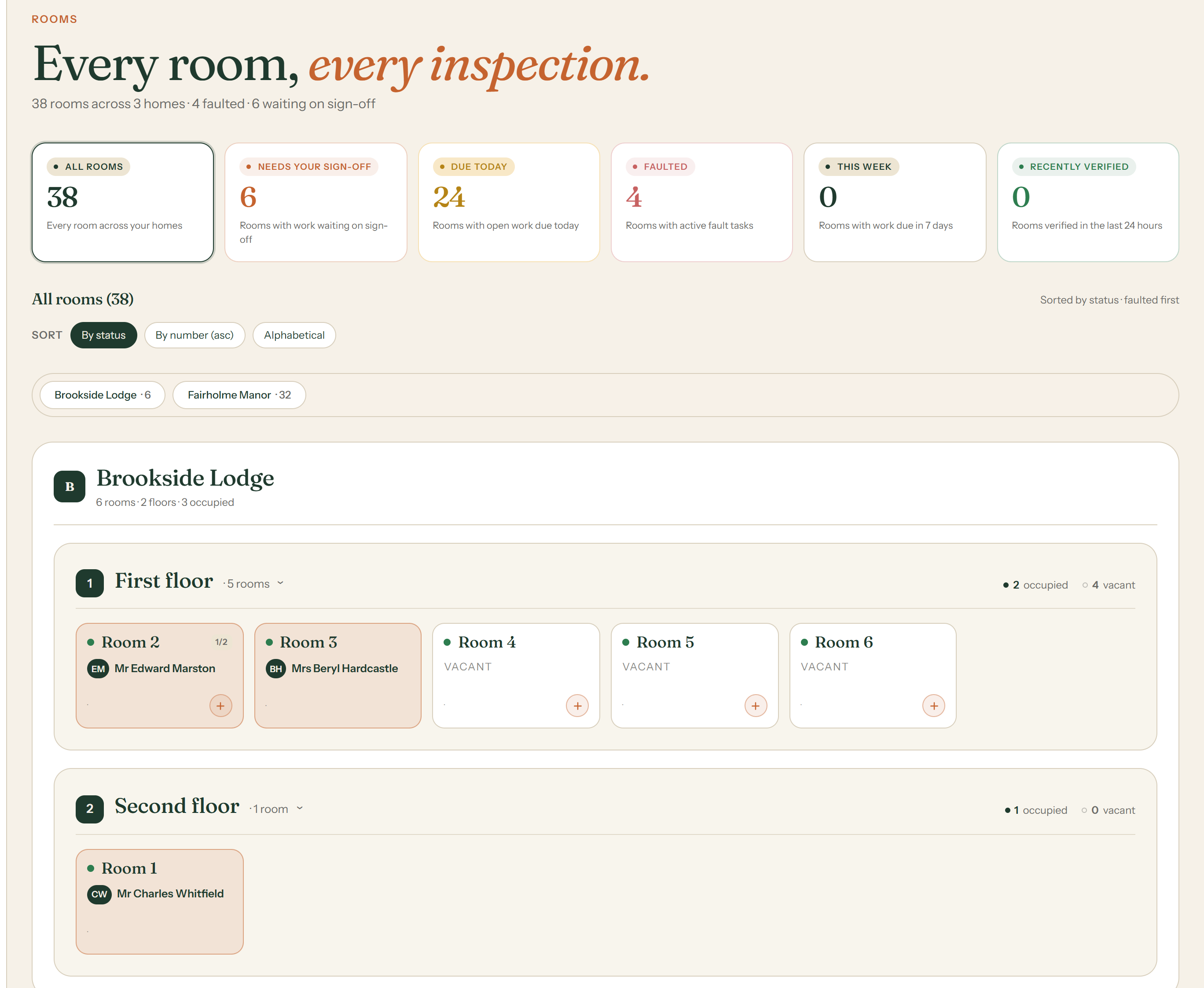
Every room is rated, and you know it before the CQC does.
Each room carries Good, Requires improvement or Inadequate in the same language the inspector uses, backed by a timestamped, photo-evidenced trail. If the CQC rang right now, you would say come in.
| A | B | C | D | E | F | |
|---|---|---|---|---|---|---|
| 1 | Evidence | Location | Found? | Updated | Notes | |
| 2 | walkarounds | binder upstairs | some | March | pages missing | |
| 3 | incidents 2024 | Emily's desk | ? | |||
| 4 | photos | various | no | see photo sheet | ||
| 5 | fridge sheets | kitchen wall | Y | faded | ||
| 6 | training certs | filing cabinet | 2023 | which one? | ||
| 7 | fire drills | ask Mike | ||||
| 8 | ||||||
| 9 | ||||||
| 10 | ||||||
| 11 | ||||||
| 12 | ||||||
| 13 | ||||||
| 14 | ||||||
| 15 | ||||||
| 16 | ||||||
| 17 | ||||||
| 18 | ||||||
| 19 | ||||||
| 20 | ||||||
| 21 | ||||||
| 22 | ||||||
| 23 | ||||||
| 24 | ||||||
| 25 | ||||||
| 26 | ||||||
| 27 | ||||||
| 28 | ||||||
| 29 | ||||||
| 30 | ||||||
| 31 | ||||||
| 32 | ||||||
| 33 | ||||||
| 34 | ||||||
| 35 | ||||||
| 36 | ||||||
| 37 | ||||||
| 38 | ||||||
| 39 | ||||||
| 40 | ||||||
| 41 | ||||||
| 42 | ||||||
| 43 | ||||||
| 44 | ||||||
| 45 | ||||||
| 46 | ||||||
| 47 | ||||||
| 48 |
That was one day. An inspection asks about five hundred of them, and by then the answer is already written.